Answered

GLTF/GLB Export -> Event to control Node.Name and add Node.Extras values
Dan Søborg
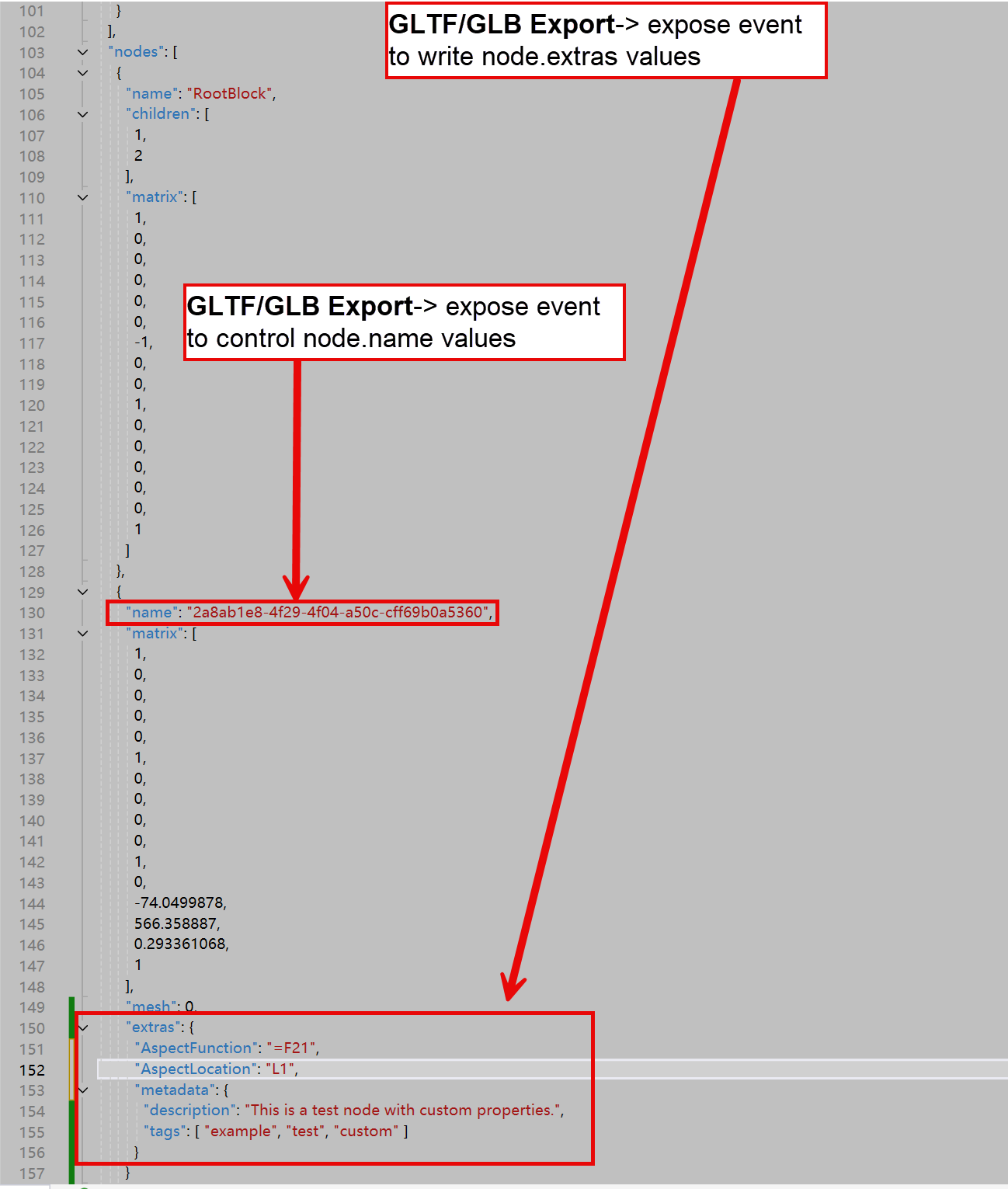
FIrst of all congratulation with the new GLFT/GLB export. Amazing work👍. However we are missing possibility to control the Node collection properties like the Node.Name and the Node.Extras so we can add our custom properties. Please expose events during export to controls these important values.
0
Comments
Hello Dan,
If you use Json in the Entity.EntityData, it's already supported!
Hi Alberto, thanks a lot for fast reply.🙏
We have for more than 10 years occupied the EntityData with some complex binary structures, so you suggest we replace our EntityData temporary and then after export set back our EntityData?
That might work but can you give an example how this JSON data should look like to get it into the Node.Extras?
Second how will this change the Node.Name property?
I can only tell you that we will fill Extras with Json if Entity.EntityData contains Json.
Node name is set as the BlockReference name, what's wrong with this?
On this topic :
I can only tell you that we will fill Extras with Json if Entity.EntityData contains Json
How should the EntityData in JSON be filled?
Like this in a string or?
"extras": { "customProperty1": "Custom Value", "customProperty2": 123, "metadata": { "description": "This is a test node with custom properties.", "tags": ["example", "test", "custom"] }
About the Node.Name where you set the Block definition Name ( Blockreference have no name) you get a lot of identical names. We want to set our Identifier that is unique for each node. You have a lot of identical node names when you use the Block Name. Block definition name is just a GUID in our implementation.
Like this:
myEnt.EntityData = "{This is a string}";
"Tags" are not supported.
Thanks Alberto, I confirm it works fine for the Custom data. Great Job🙏.
So wish now is only to control the Node name. You add the Block Name into Node name and this is not working for us. We need to replace it with something more meaningful if possible.
Is it possible that your Block.Name actually is "2a8ab1e8-4f29-4f04-a50c-cff69b0a5360"?
In that case, you need to change your block naming.
Life is not so simple sadly.
Let me explain :
We use GUID for block names since they are connected with PDM system with version and revision control. So in our solution you have “Component” in many different versions, revisions and configurations. We need to do like this because Eyeshot only has a very simple String based Blocks dictionary on the workspace ( Fully ok).
Today your Blocks collection is a simple string key, but key should have been Name, version, revision, configuration. Just idea for Eyeshot in the future, we have this solved in our solution. But this is why you see in our solution the GUID in the Block name and sadly it goes into GLB/GLFT export as well.
I would like to control and put a more meaningful Name into the GLB/GLTF file.
Hope it makes sense.
I recommend replacing names before exporting. This is an industry-standard, not a choice of ours.
It is not possible, since you get 2000 times the same name for all block reference pointing to the same definition. It was a feature wish to have event so we control, but you answer that this will not be changed. We will work around it. Thanks for fast response on this topic.
Please sign in to leave a comment.