Answered

Quad entities without black outline
Adam
When drawing quads on a dark background they are clearly visible if zoomed in, if zooming out the linear paths are still clearly visible while the quads become black due to their black outline. Is there a way to draw the quads without this outline? Otherwise I would like it to be added, thank you!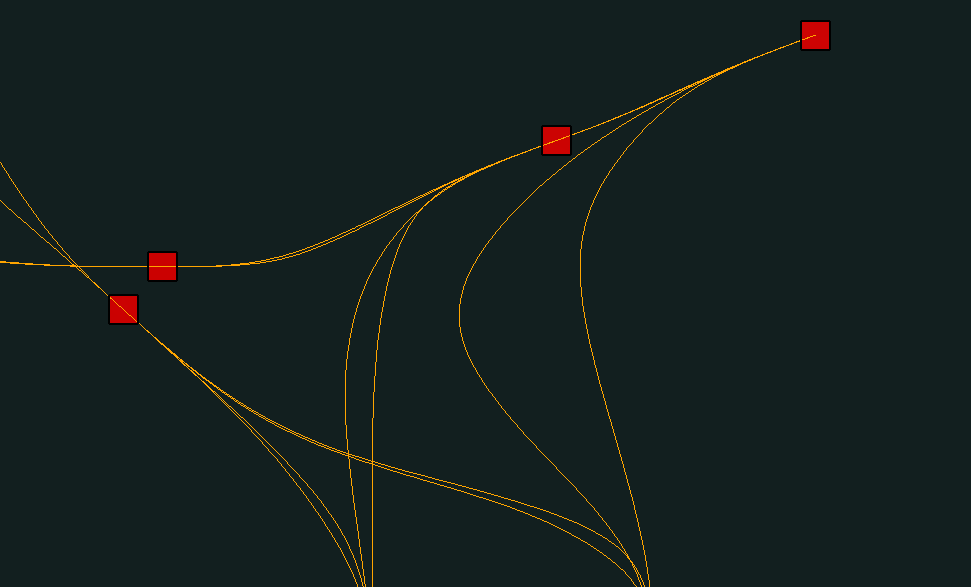

1
Comments
Did you try using the devDept.Eyeshot.Entities.Point entity? You get a zoom-invariant square. Without edge by the way.
Yes, I initially used the point entity but unfortunately I don't want it to be zoom-invariant. Is there an option to disable that for point?
Or maybe an option to change the edge color on the quad entity? That would suffice as well.
No, sorry.
Okay, thank you for your help!
Would love for any (or all) of these suggestions to be added in future versions if possible.
Did you try disabling edge drawing?
Model.Shaded.ShowEdges = false or Model.Rendered.ShowEdges = false
Thank you very much, that (Model.Rendered.ShowEdges = false;) worked!
Will have to check more closely if it affected anything else in an unwanted manner but at first glance it looks perfect.
You can even inherit your own class from Quad entity, override the DrawEdges() method and intentionally don't call the base implementation.
Please sign in to leave a comment.