
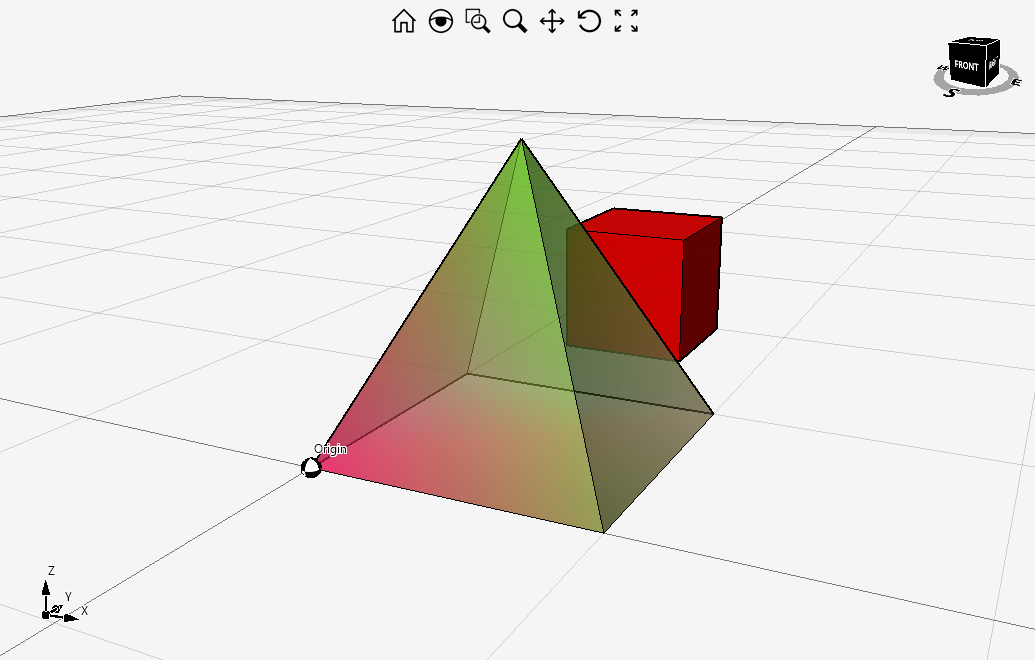
Here's an example showing how to override the Mesh class in order to draw a semi-transparent mesh with Multicolor nature type.
public class MyMesh : Mesh
{
    public MyMesh(Mesh mesh) : base(mesh) { }

    protected override void DrawEntity(RenderContextBase context, object myParams)
    {
        byte alpha = Color.A;

        switch (MeshNature)
        {
            case natureType.MulticolorPlain:
                context.DrawMulticolorPlainTriangles(Triangles, Vertices, Normals, alpha);
                break;
            case natureType.MulticolorSmooth:
                context.DrawMulticolorSmoothTriangles(Triangles, Vertices, Normals, alpha);
                break;
            default:
                base.DrawEntity(context, myParams);
                break;
        }
    }
}Then use it as shown below.
Mesh baseMesh = new Mesh(Mesh.natureType.MulticolorPlain);

baseMesh.Vertices = new PointRGB[]
{
    new PointRGB(0, 0, 0, 255, 0, 87),
    new PointRGB(10, 0, 0, 134, 148, 43),
    new PointRGB(10, 10, 0, 255, 233, 167),
    new PointRGB(0, 10, 0, 133, 222, 255),
    new PointRGB(5, 5, 10, 100, 223, 12)
};

baseMesh.Triangles = new IndexTriangle[]
{
    new IndexTriangle(0, 1, 2),
    new IndexTriangle(0, 2, 3),
    new IndexTriangle(0, 1, 4),
    new IndexTriangle(1, 2, 4),
    new IndexTriangle(2, 3, 4),
    new IndexTriangle(3, 0, 4)
};

MyMesh mesh = new MyMesh(baseMesh);

// Set the ColorMethod
mesh.ColorMethod = colorMethodType.byEntity;

// Set the color with alpha < 255
mesh.Color = Color.FromArgb(150, Color.Black);

design1.Entities.Add(mesh);

// Add another mesh for transparency comparison
var box1 = Mesh.CreateBox(5, 5, 5);
box1.Translate(2, 15, 0);

design1.Entities.Add(box1, Color.Red);

design1.SetView(viewType.Front, true, false);
design1.Invalidate();
Comments
great example he helped me a lot!
I found an error in line
case natureType.MulticolorSmooth:
context.DrawMulticolorPlainTriangles(Triangles, Vertices, Normals, alpha);
break;
FIX:
case natureType.MulticolorSmooth:
context.DrawMulticolorSmoothTriangles(Triangles, Vertices, Normals, alpha);
break;
Thank you!
Code fixed, thanks for reporting it :)
I want to create a rect region which should be zoom/position independent. This code does that, but I want the rect region to be transparent.
somehow this alpha value of 50 in DrawMulticolorPlainTriangles() has no effect. How to make it transparent?
Thanks in advance!
Please sign in to leave a comment.